
UpGrad vs Springboard UI/UX Design Course Reviews…Which One is Right for You?
UpGrad vs Springboard UI/UX Design Course Reviews
UpGrad UI/UX Design Course: Courses, Key Highlights, Syllabus, Placements, Fees and Reviews
UpGrad UI/UX Design Course
The upGrad UI/UX Design Bootcamp allows learners to easily niche down in this highly competitive field due to its comprehensive curriculums. Ideal for the users seeking to level up their experience, this bootcamp consists of a combination of professional practice projects, live lessons, and independent study. Depending on the level of practice: whether this is the first experience in the UI/UX field or the desire to deepen the knowledge and skills in this area, this program will allow you to achieve the stated goal.
UpGrad UI/UX Design Course Key Highlights
| Feature | Details |
|---|---|
| Gen AI Integration | Includes training on modern Generative AI tools and technologies. |
| Career Support | Personalized career coaching, AI-driven mock interviews, and dedicated portfolio sessions. |
| Hands-On Projects | Weekly assignments, periodic projects, and mentor-led projects for practical experience. |
| Soft Skills Training | Specialized sessions for aptitude, communication, confidence-building, and freelancing. |
| Freelance Training | Bootcamps focused on building a freelance career in UI/UX design. |
| Curriculum Depth | Covers fundamentals to advanced UI/UX concepts, including design thinking and the double diamond approach. |
| Live Sessions | Over 140+ hours of live instruction and interactive learning. |
| Recorded Content | 25+ hours of recorded video content for self-paced learning. |
| Portfolio Development | Includes dedicated sessions for creating and refining a professional portfolio. |
| Industry Projects | 15+ industry-grade projects to build real-world experience. |
| Instructor Expertise | Learn from experienced industry professionals and design experts. |
| Masterclasses | 4+ masterclasses featuring design heads and industry leaders. |
UpGrad UI/UX Design Course Syllabus
| Module | Topics Covered |
|---|---|
| Module 1: Fundamentals | UI/UX design principles, history of UX, Design Thinking process, Introduction to Figma. |
| Module 2: Research | User research techniques, gathering and analyzing user insights. |
| Module 3: Surveys | Designing effective surveys, interpreting survey results. |
| Module 4: Ideation | Brainstorming methods, idea generation techniques, user persona creation. |
| Module 5: Sketching | Basic sketching techniques, wireframing, prototyping fundamentals. |
| Module 6: Wireframing | Creating wireframes, low-fidelity prototypes, user flows, and interactive elements. |
| Module 7: Prototyping | Developing interactive prototypes, usability testing, feedback incorporation. |
| Module 8: UI Design | Visual design principles, color theory, typography, and UI components. |
| Module 9: Advanced UX Techniques | Advanced user testing, heuristic evaluation, usability heuristics. |
| Module 10: Portfolio Development | Building and refining a professional design portfolio, showcasing projects and case studies. |
UpGrad UI/UX Design Course Placements
- Job Assistance: Help with finding a job, including resume and interview prep.
- Career Coaching: Personalized advice for career planning and job search.
- Resume Support: Tips on creating a strong resume for UI/UX roles.
- Mock Interviews: Practice interviews to prepare for real ones.
- Job Network: Access to top companies and job listings.
- Job Portal: Special job portal with openings from leading firms.
- Hiring Partners: Connections with companies like Accenture and Adobe.
- Career Transition Help: Support for moving into new roles, including freelance options.
- Good Placement Rate: High success rate in getting jobs.
UpGrad UI/UX Design Course Fees

UpGrad UI/UX Design Course Reviews
The reviews for the upGrad UI/UX Design Bootcamp are largely positive. Many students report that the course is informative, well-structured, and provides plenty of hands-on projects and real-world applications. Students often mention that the instructors showcase strong knowledge and a teaching style that keeps them engaged. A career support team is available to give students guidance, revise their resumes if needed, and help with job placement. Students like the live classes, self-paced learning, and a structure that is flexible enough to fit various schedules. Many mention that the curriculum focuses heavily on building a robust portfolio, and students learn important modern design software and AI concepts. Most reviews are positive regarding both the education and the future career benefits, although some students felt that the course was an expensive investment.
Springboard UI/UX Design Course: Courses, Key Highlights, Syllabus, Placements, Fees and Reviews
Springboard UI/UX Design Course
Springboard UI/UX Design Bootcamp is a user-driven and super efficient online program to help you succeed in your career as an UI / UX designer This bootcamp also comes with a 9-month part-time study schedule. With a project-based curriculum, 1:1 mentorship and professional guidance every step of the way including up to 6 months post-graduation job preparation.
Springboard UI/UX Design Course Key Highlights
| Key Highlight | Description |
|---|---|
| 100% Online | Accessible from anywhere, allowing for flexible learning. |
| Beginner-Friendly | Designed for those with no prior design experience. |
| Project-Based Curriculum | Focuses on hands-on projects to build practical design skills. |
| 1:1 Mentorship | Personalized guidance from industry experts to help you stay on track and achieve your goals. |
| Career Coaching | Support with portfolio building, resume crafting, LinkedIn profile polishing, and mock interviews. |
| Four-Week Externship | Gain real-world experience with an external client to apply your skills in a professional setting. |
| AI Learning Units | New modules integrated into the curriculum to teach the practical use of AI in design. |
| Job Prep for 6 Months | Continued support for up to 6 months after graduation to help you land a job. |
Springboard UI/UX Design Course Syllabus
| Module | Topics Covered |
|---|---|
| 1. Introduction to UX and UI Design | – Design fundamentals – Differences between UI and UX – Skills and roles in UI/UX design |
| 2. Introduction to AI and Its Relevance to UX | – AI applications in design – Using AI for research and persona creation – Leveraging AI tools |
| 3. Intro to Design Tools | – Overview of design tools – Basic functionalities and applications of design software |
| 4. Design Thinking | – Principles of design thinking – Applying design thinking to real-world scenarios |
| 5. Intro to UX Research | – Methods for conducting user research – Basics of UX research techniques |
| 6. Conducting Research | – Performing user research – Analyzing research data |
| 7. Synthesizing Your Research | – Synthesizing research findings – Creating user personas and scenarios |
| 8. Product Types: Typical Problems and Solutions | – Understanding different product types – Identifying common design problems and solutions |
| 9. Design and Ideate | – Generating design ideas – Ideation techniques and methods |
| 10. Information Architecture | – Structuring and organizing information – Creating user-friendly navigation |
| 11. UI, Interaction, and Mobile Design Principles | – UI design principles – Interaction design – Mobile design considerations |
| 12. Sketching and Guerrilla Usability Testing | – Sketching techniques – Conducting guerrilla usability testing – Collecting feedback |
| 13. Wireframing | – Techniques for wireframing – Creating and using wireframes |
| 14. Designing Systems and Brand Platforms | – Designing system interfaces – Developing brand platforms and guidelines |
| 15. Building a Style Guide | – Creating a style guide – Ensuring consistency in design |
| 16. High Fidelity Mockups | – Designing high-fidelity mockups – Implementing design details and visual elements |
| 17. Prototyping and Animations | – Building interactive prototypes – Adding animations to enhance user experience |
| 18. Testing | – Conducting usability testing – Analyzing and implementing feedback |
| 19. Collaborating with Developers | – Working with development teams – Communicating design requirements effectively |
| 20. Presenting Your Work | – Techniques for presenting design work – Creating compelling design presentations |
| 21. Current and Future Trends in AI and UX | – Exploring emerging trends in AI and UX – Adapting to future developments |
| 22. Psychology Principles and Special Topics | – Applying psychology principles to design – Addressing special topics in UX |
| 23. The Business of UX | – Understanding the business aspects of UX – Navigating the UX job market and career development |
| 24. Collaboration and Professionalism | – Effective collaboration with teams – Professionalism in the workplace |
| 25. Projects | – Capstone projects – Design sprint and project implementation |
| 26. Career Support | – Resume building – Portfolio development – Interview preparation |
Springboard UI/UX Design Course Placements
- Companies Hiring Graduates: Students have found jobs at top companies like Amazon and Google.
- Average Salary Increase: Students see an average pay increase of $24,523 after completing the bootcamp.
- Starting Salary: The average starting salary for new graduates is $84,316.
- Job Prep Help: Students get up to 6 months of help with job searches, including building a portfolio, crafting a resume, improving a LinkedIn profile, and practicing interviews.
- Externship: A four-week remote project with a startup to gain real work experience.
- Career Coaching: One-on-one coaching to guide graduates through job searching and interview preparation.
- Hands-On Projects: Includes real client projects and capstone assignments to build practical skills.
- Career Success: Many students get jobs in good companies and design firms.
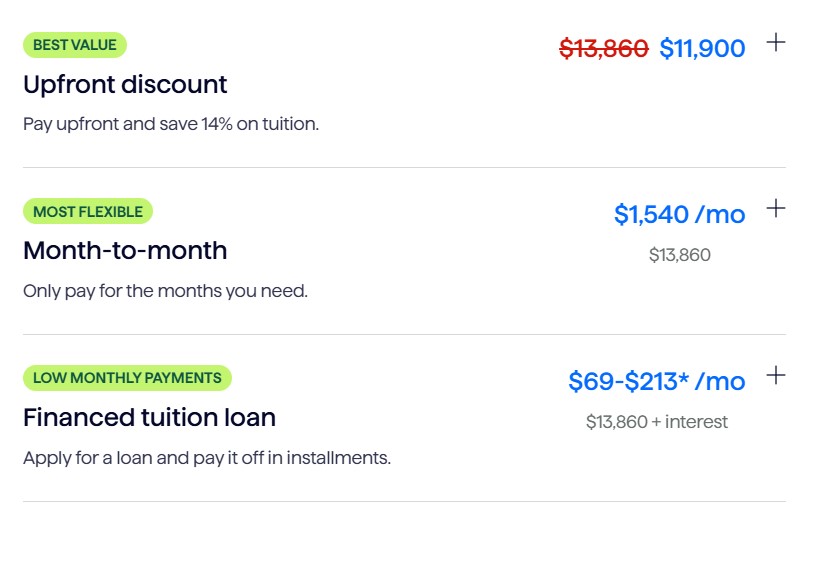
Springboard UI/UX Design Course Fees
Springboard UI/UX Design Course Reviews
When it comes to design, the Springboard UI/UX Design Bootcamp is a comprehensive solution for anyone who wishes to begin or further their UX/UI career. The university boasts a near-perfect job placement rate among its graduates with jobs at companies like Amazon and Google – clear evidence of the program’s robust industry ties and competent curriculum. Graduates, by contrast, can expect a substantial average increase of $24 523 in the form of starting salaries that typically clock in at about over$84K. In addition to an extensive learning experience, the bootcamp also helps students through job preparation assistance for up to six months with portfolio building and refining a resume or LinkedIn profile or mock interviews. In addition, the program includes a four-week externship with startup companies that provides participants invaluable experiential learning experience. The program goes beyond the classroom, as it also features one-on-one career coaching and real-world projects to further develop a skill base in addition to employability while training. In general, the bootcamp is set out to prepare students for landing a job in UI/UX design through intensive training.
UpGrad vs Springboard UI/UX Design Course Difference
| Feature | UpGrad UI/UX Design Course | Springboard UI/UX Design Course |
|---|---|---|
| Learning Mode | Combination of live sessions, hands-on projects, and self-paced study | Fully online and self-paced with project-based learning |
| Live Sessions | Over 140+ hours | Not specified |
| Recorded Content | 25+ hours | Not specified |
| Mentorship | Industry professionals and design experts | 1:1 mentorship with industry experts |
| Externship | Not included | Four-week remote project with an external client |
| AI Integration | Includes training on Generative AI tools | Specific modules on AI applications in design |
| Projects | 15+ industry-grade projects | Real client projects and a capstone project |
| Masterclasses | 4+ with design experts and leaders | Not specified |
| Career Support | Personalized coaching, resume support, mock interviews, job portal | Up to 6 months of job prep support, including portfolio and resume help |
| Job Network | Connections with companies like Accenture and Adobe | Graduates find jobs at companies like Amazon and Google |
| Placement Rate | High success rate (exact figures not detailed) | High placement rate with notable companies |
| Starting Salary | Not specified | Average starting salary: $84,316 |
| Average Salary Increase | Not specified | $24,523 |
| Fees | Generally considered high, specific details not provided | Competitive, specific details not provided |
| Reviews | Positive feedback on curriculum, projects, and instructors; some concerns about cost | High praise for mentorship, externship, and job placement support |
Conclusion
When choosing between UpGrad and Springboard for a UI/UX Design course, consider the following factors:When choosing between UpGrad and Springboard for a UI/UX Design course, consider the following factors:
UpGrad is beneficial for those that want pre-scheduled classes and video sessions anda timetable of which courses are to be completed at what time. What it does cover is a good mix of UI/UX design concepts, projects, and very important career assistance. Therefore, if you prefer a balanced curriculum where your masterclasses are to be led by professionals and willing to pay a high-fee program along with career services that could last for several years, then yes, UpGrad might be for you.
Springboard, on the other hand, is for individuals who enrol in a fully online and flexible course that leans heavily on a project based approach to learning. Mentorship is also 1:1, the externship lasts four weeks, and the job support after graduation is also exceptionally good. That is why if choice of the mentors and the need for the large amount of flexibility in the schedule are your main concerns and you want to gain the practical experience working on clients’ projects, Springboard may be the better option.
Although, both of them have good reputation and provide important career assistance, you should make your decision based on the type of learning, your career plan, and financially possibilities.
For further clarification and fee concession, you can contact
- referral code– Click Here
- Contact Info– 7735361649
ALSO READ: UpGrad vs Coursera Business Analytics Course Reviews: Which One is Right for You?
Frequently Asked Questions (FAQ)
1. What are the main differences between UpGrad and Springboard UI/UX Design courses?
UpGrad offers a structured learning experience with a mix of live sessions, hands-on projects, and self-paced study. It includes over 140 hours of live instruction, 15+ industry-grade projects, and extensive career support. Springboard provides a flexible, fully online learning environment with 1:1 mentorship, a four-week externship, and project-based learning. It focuses on practical skills and includes up to 6 months of job support.
2. Which course is better for beginners?
Springboard is designed to be beginner-friendly, with a project-based curriculum and 1:1 mentorship, making it a good option for those new to UI/UX design. UpGrad also caters to beginners but offers a more structured approach with live and recorded content.
3. How does career support differ between the two courses?
UpGrad provides personalized career coaching, resume support, mock interviews, and a dedicated job portal with connections to top companies. Springboard offers up to 6 months of job preparation support, including portfolio building, resume crafting, LinkedIn profile improvement, and a four-week externship.
4. What is the cost of each course?
The specific fees for both UpGrad and Springboard are not detailed here, but UpGrad is generally considered to be on the higher end, while Springboard offers a competitive price. It’s advisable to check their websites or contact their admissions teams for the most current pricing information.
5. Are there any industry-recognized certifications upon completion?
Both UpGrad and Springboard provide certifications upon completion of their respective programs, which are recognized in the industry. These certifications can help validate your skills and knowledge in UI/UX design.
6. What kind of job placement assistance is offered?
UpGrad offers job assistance through resume support, career coaching, mock interviews, and connections with hiring partners. Springboard provides up to 6 months of job prep support, including help with portfolio development, resume crafting, LinkedIn profile improvement, and mock interviews, along with a four-week externship.
7. How do the courses handle practical experience?
UpGrad includes 15+ industry-grade projects and opportunities for hands-on practice. Springboard focuses heavily on practical experience through real client projects, a capstone project, and a four-week externship with a startup.
8. Can I learn at my own pace with both courses?
UpGrad offers a blend of live and recorded content, providing some flexibility. Springboard is fully online and self-paced, allowing you to learn at your own speed and fit the course into your schedule.
9. What are the key benefits of each program?
- UpGrad: Extensive live instruction, in-depth curriculum, numerous industry projects, and strong career support.
- Springboard: Flexible learning, 1:1 mentorship, practical projects, and a four-week externship with real clients.
10. How do I choose the right course for me?
Consider your learning preferences, career goals, and budget. If you prefer structured learning with a mix of live and self-paced content and are willing to invest in a high-fee program, UpGrad might be suitable. If you need flexibility, personalized mentorship, and practical experience through client projects, Springboard could be a better fit.