
Springboard vs Guvi UI/UX Design Course Reviews…Which One is Right for You?
Springboard vs Guvi UI/UX Design Course Reviews
Comparing Springboard and Guvi for UI/UX Design courses will help you choose the right platform for your needs.
Springboard offers a comprehensive UI/UX Design Bootcamp that is professionally designed to cover core concepts and practical skills. This course includes a structured curriculum with a focus on design thinking, user interactions, wireframing, and UX testing. It provides personalized mentorship from industry professionals, career coaching, and intensive support to prepare students for advanced UI/UX design roles. The program also includes a four-week externship with a startup, real-world projects, and up to six months of job prep assistance after graduation.
Guvi, on the other hand, provides multiple UI/UX design courses catering to various skill levels. Guvi’s approach allows students to learn at their own pace, with a one-time payment covering course materials and lifetime access to tutor support. The platform offers more affordable courses and a broad selection of options taught by experienced trainers.
By comparing the course structures, costs, instructors, and student experiences between Springboard and Guvi, you can make an informed decision about which UI/UX design program best fits your career goals and learning style.
Springboard UI/UX Design Course: Courses, Key Highlights, Syllabus, Placements, Fees and Reviews
Springboard UI/UX Design Course
Springboard UI/UX Design Bootcamp is a user-driven and super efficient online program to help you succeed in your career as an UI / UX designer This bootcamp also comes with a 9-month part-time study schedule. With a project-based curriculum, 1:1 mentorship and professional guidance every step of the way including up to 6 months post-graduation job preparation.
Springboard UI/UX Design Course Key Highlights
| Key Highlight | Description |
|---|---|
| 100% Online | Accessible from anywhere, allowing for flexible learning. |
| Beginner-Friendly | Designed for those with no prior design experience. |
| Project-Based Curriculum | Focuses on hands-on projects to build practical design skills. |
| 1:1 Mentorship | Personalized guidance from industry experts to help you stay on track and achieve your goals. |
| Career Coaching | Support with portfolio building, resume crafting, LinkedIn profile polishing, and mock interviews. |
| Four-Week Externship | Gain real-world experience with an external client to apply your skills in a professional setting. |
| AI Learning Units | New modules integrated into the curriculum to teach the practical use of AI in design. |
| Job Prep for 6 Months | Continued support for up to 6 months after graduation to help you land a job. |
Springboard UI/UX Design Course Syllabus
| Module | Topics Covered |
|---|---|
| 1. Introduction to UX and UI Design | – Design fundamentals – Differences between UI and UX – Skills and roles in UI/UX design |
| 2. Introduction to AI and Its Relevance to UX | – AI applications in design – Using AI for research and persona creation – Leveraging AI tools |
| 3. Intro to Design Tools | – Overview of design tools – Basic functionalities and applications of design software |
| 4. Design Thinking | – Principles of design thinking – Applying design thinking to real-world scenarios |
| 5. Intro to UX Research | – Methods for conducting user research – Basics of UX research techniques |
| 6. Conducting Research | – Performing user research – Analyzing research data |
| 7. Synthesizing Your Research | – Synthesizing research findings – Creating user personas and scenarios |
| 8. Product Types: Typical Problems and Solutions | – Understanding different product types – Identifying common design problems and solutions |
| 9. Design and Ideate | – Generating design ideas – Ideation techniques and methods |
| 10. Information Architecture | – Structuring and organizing information – Creating user-friendly navigation |
| 11. UI, Interaction, and Mobile Design Principles | – UI design principles – Interaction design – Mobile design considerations |
| 12. Sketching and Guerrilla Usability Testing | – Sketching techniques – Conducting guerrilla usability testing – Collecting feedback |
| 13. Wireframing | – Techniques for wireframing – Creating and using wireframes |
| 14. Designing Systems and Brand Platforms | – Designing system interfaces – Developing brand platforms and guidelines |
| 15. Building a Style Guide | – Creating a style guide – Ensuring consistency in design |
| 16. High Fidelity Mockups | – Designing high-fidelity mockups – Implementing design details and visual elements |
| 17. Prototyping and Animations | – Building interactive prototypes – Adding animations to enhance user experience |
| 18. Testing | – Conducting usability testing – Analyzing and implementing feedback |
| 19. Collaborating with Developers | – Working with development teams – Communicating design requirements effectively |
| 20. Presenting Your Work | – Techniques for presenting design work – Creating compelling design presentations |
| 21. Current and Future Trends in AI and UX | – Exploring emerging trends in AI and UX – Adapting to future developments |
| 22. Psychology Principles and Special Topics | – Applying psychology principles to design – Addressing special topics in UX |
| 23. The Business of UX | – Understanding the business aspects of UX – Navigating the UX job market and career development |
| 24. Collaboration and Professionalism | – Effective collaboration with teams – Professionalism in the workplace |
| 25. Projects | – Capstone projects – Design sprint and project implementation |
| 26. Career Support | – Resume building – Portfolio development – Interview preparation |
Springboard UI/UX Design Course Placements
- Companies Hiring Graduates: Students have found jobs at top companies like Amazon and Google.
- Average Salary Increase: Students see an average pay increase of $24,523 after completing the bootcamp.
- Starting Salary: The average starting salary for new graduates is $84,316.
- Job Prep Help: Students get up to 6 months of help with job searches, including building a portfolio, crafting a resume, improving a LinkedIn profile, and practicing interviews.
- Externship: A four-week remote project with a startup to gain real work experience.
- Career Coaching: One-on-one coaching to guide graduates through job searching and interview preparation.
- Hands-On Projects: Includes real client projects and capstone assignments to build practical skills.
- Career Success: Many students get jobs in good companies and design firms.
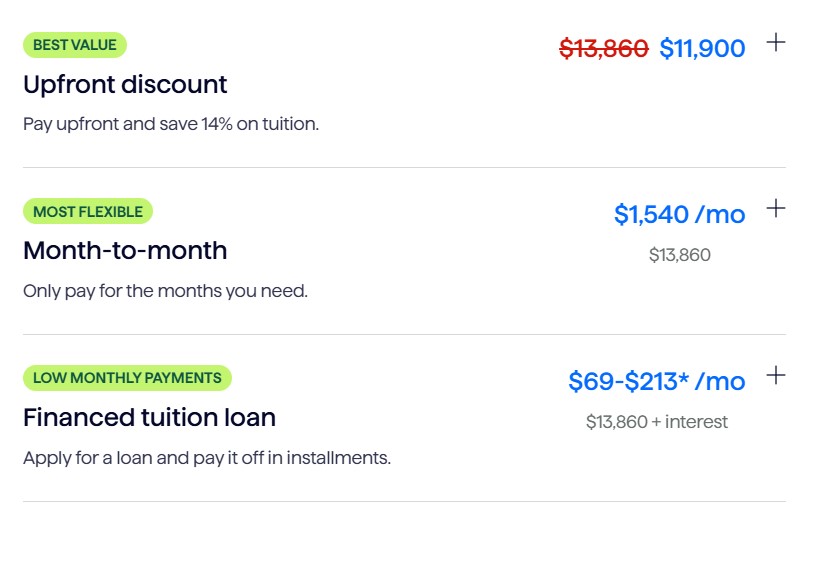
Springboard UI/UX Design Course Fees
Springboard UI/UX Design Course Reviews
When it comes to design, the Springboard UI/UX Design Bootcamp is a comprehensive solution for anyone who wishes to begin or further their UX/UI career. The university boasts a near-perfect job placement rate among its graduates with jobs at companies like Amazon and Google – clear evidence of the program’s robust industry ties and competent curriculum. Graduates, by contrast, can expect a substantial average increase of $24 523 in the form of starting salaries that typically clock in at about over$84K. In addition to an extensive learning experience, the bootcamp also helps students through job preparation assistance for up to six months with portfolio building and refining a resume or LinkedIn profile or mock interviews. In addition, the program includes a four-week externship with startup companies that provides participants invaluable experiential learning experience. The program goes beyond the classroom, as it also features one-on-one career coaching and real-world projects to further develop a skill base in addition to employability while training. In general, the bootcamp is set out to prepare students for landing a job in UI/UX design through intensive training.
Guvi UI/UX Design Course: Courses, Key Highlights, Syllabus, Placements, Fees and Reviews
Guvi UI UX Design Course
The Guvi UI UX Design Course teaches all aspects of UI UX design, from basics to advanced topics. In live sessions, you’ll learn fundamental design concepts and advanced design principles with expert guidance. The course includes real-world projects and design tasks for hands-on practice. You’ll receive one-on-one mentorship throughout your learning journey and join a community of over 2,000 students and alumni.
Guvi UI UX Design Course Key Highlights
| Key Highlights | Details |
|---|---|
| Expert-Designed Curriculum | Created by subject-matter experts. |
| High Salary Potential | Highest recorded salary: ₹21 Lakhs. |
| Flexible Learning | Includes live classes and lifetime access to recorded videos. |
| Accredited Course | NASSCOM approved with a government-approved certification. |
| Additional Resources | Access to templates and source files. |
| Real Projects | Opportunity to work on real projects during the course. |
| Tools Covered | Figma, Maze, Miro, Hotjar, Notion, Typeform, Dribbble, Behance (essential tools covered). |
Guvi UI UX Design Course Syllabus
| Module | Topics Covered |
|---|---|
| Module 1: UX Fundamentals | 1. UX Fundamentals: Introduction to core UX concepts and principles. 2. Business Requirement Gathering: Techniques for collecting business requirements. 3. User Research: Methods for understanding user needs and behaviors. 4. User Interview Techniques: Best practices for conducting user interviews. |
| Module 2: Research Data Analysis | 1. Research Data Analysis: Techniques for analyzing user research data. 2. Competitor Benchmarking: Evaluating competitors to identify opportunities. 3. Heuristic Analysis: Identifying usability issues using heuristic evaluation. |
| Module 3: Ideation and Mapping | 1. Ideation (up to 3 techniques): Creative methods to generate ideas. 2. Whiteboarding: Visual brainstorming on whiteboards. 3. Journey Maps: Visualizing the user’s journey. 4. Motivation Mapping: Understanding user motivations. 5. Empathy Mapping Process: Mapping user thoughts, feelings, and actions. 6. Information Architecture: Structuring and organizing information. 7. Navigation: Designing intuitive navigation systems. 8. Content through Card Sorting: Organizing content using card sorting. 9. Sitemaps: Creating visual representations of content hierarchy. 10. User Flows: Mapping steps users take to achieve goals. |
| Module 4: Usability Testing | 1. A/B Testing: Comparing two versions to determine which performs better. 2. Remote Usability Testing: Gathering feedback from users remotely. 3. Gorilla Testing: Quick and informal usability testing. |
| Module 5: Design Tools | 1. Figma: Using Figma for designing and prototyping. 2. Adobe XD: Creating and sharing UX designs with Adobe XD. 3. Adobe Photoshop: UI design and editing with Photoshop. 4. Adobe Illustrator: Creating vector graphics with Illustrator. 5. Miro Board & More: Utilizing Miro and other collaborative tools. |
| Module 6: Advanced UX Concepts | 1. Heuristics Principles: Applying heuristic principles to UX evaluation. 2. UX Laws: Understanding key UX laws. 3. UX Case Studies: Analyzing real-world UX projects. 4. Minimalism and Maximalism: Principles of minimalism and maximalism in design. 5. Cognitive Bias: Designing around cognitive biases. |
Guvi UI UX Design Course Placement Support
- Placement Help: Guvi supports finding jobs, mentoring for careers, and practicing interviews.
- Career Guidance: Personal help for planning your career.
- Portfolio Building: Assistance with creating a strong portfolio.
- Practice Interviews: Sessions to get ready for real job interviews.
- Job Opportunities: Graduates have good chances to get jobs at top companies.
Guvi UI UX Design Course Fees
- Total Fee: ₹94,999 (inclusive of GST).
- EMI Options: Up to 12 months available.
- Refund Policy: 7-day refund option.
- Prebootcamp: Initial evaluation sessions available.

Guvi UI UX Course Review Fees
Guvi UI UX Design Course Review
Guvi’s UI UX Design course has been praised for its hands-on learning, 24/7 mentor support, and positive environment. Students liked the industry-relevant content and the quality of instruction.
Here are some comments from learners:
Gokak Mohd Ishtiyaque: “Guvi provides a caring atmosphere. I like how inspiring you are.”
Vishally: “The teaching quality is great. Guvi gets a five out of five from me.”
Shubham Nehete: “Guvi opens my mind to new possibilities. It’s the best place to change careers.”
Tejas Samanthapudi: “The best place to start a new profession is Guvi. Mentors are professionals in the field.”
Gokul: “The weekly assignments and live sessions are really helpful. Guvi has made a useful program for our professional lives.”
Springboard vs Guvi UI/UX Design Course Review
| Feature | Springboard | Guvi |
|---|---|---|
| Course Structure | Comprehensive Bootcamp with 9-month part-time schedule | Multiple courses with flexible learning pace |
| Curriculum | Project-based, includes design thinking, UX research, wireframing, prototyping, and more | Covers UX fundamentals, research, ideation, usability testing, advanced UX concepts |
| Mentorship | 1:1 personalized mentorship from industry professionals | 1:1 mentorship throughout the course |
| Career Support | Career coaching, job prep assistance for up to 6 months, externship | Career guidance, portfolio building, practice interviews |
| Externship/Real-World Projects | Four-week externship with a startup, real-world projects | Real-world projects included in the course |
| AI Integration | Modules on AI applications in design | No specific focus on AI |
| Tools Covered | No specific tools mentioned | Figma, Maze, Miro, Hotjar, Notion, Typeform, Dribbble, Behance |
| Accreditation | Not mentioned | NASSCOM approved with government certification |
| Fee | Not specified | ₹94,999 (inclusive of GST), EMI options available |
| Refund Policy | Not specified | 7-day refund option |
| Student Reviews | Positive reviews with high placement rate, significant salary increase | Praised for hands-on learning and mentor support |
| Average Starting Salary | $84,316 | Not specified |
| Average Salary Increase | $24,523 | Highest recorded salary: ₹21 Lakhs |
| Job Placement Companies | Amazon, Google | Not specified |
Conclusion
Defining which platform to pick for a UI/UX Design is all about personal disposition and objectives between the two – Springboard and Guvi.
Springboard provides a professional course design like bootcamp, and provides learning with practice and career assistance. It has an externship component of four weeks and employment training of up to six weeks. It is an accelerated program, recommended for candidates who seek a program with a substantial link to practice.
Guvi is convenience oriented with many courses and you can learn them with the pace of your choice. It has free and lifetime access to all course material and it is therefore cheaper. These are courses offered by Guvi that may be favorable if you want and open learning environment with constant coaching.
They are equally beneficial in their ways, so focus on what is crucial for you, such as the structure, career opportunities, or speed of learning if you are going to join UI/UX design.
For further clarification and fee concession, you can contact
- referral code– Click Here
- Contact Info– 7735361649
ALSO READ: UpGrad vs Coursera Business Analytics Course Reviews: Which One is Right for You?
Frequently Asked Questions
1. What is the main difference between Springboard and Guvi UI/UX Design courses?
- Springboard: Offers a structured, intensive bootcamp with personalized mentorship, a four-week externship, and up to six months of job preparation support. It is ideal for those looking for a comprehensive and guided learning experience.
- Guvi: Provides multiple courses with a flexible learning pace, lifetime access to materials, and a one-time payment. It is suitable for learners who prefer self-paced learning and more affordable options.
2. Are the courses from Springboard and Guvi accredited?
- Springboard: Offers a recognized bootcamp with industry credibility and strong job placement support. The program includes real-world projects and externships.
- Guvi: Provides NASSCOM-approved courses with government certification, offering industry-relevant training and practical experience.
3. How does the job placement support differ between Springboard and Guvi?
- Springboard: Provides up to six months of job preparation support, including career coaching, portfolio building, resume crafting, and mock interviews. Students also get a four-week externship to gain real-world experience.
- Guvi: Offers career guidance, portfolio building assistance, and practice interviews. The focus is on helping students find jobs through support and mentoring.
4. What are the fees for the UI/UX Design courses?
- Springboard: Typically involves a higher fee due to its extensive support and structured curriculum. Exact costs may vary, and financing options are available.
- Guvi: Costs ₹94,999 (inclusive of GST), with EMI options up to 12 months and a 7-day refund policy.
5. Can I learn at my own pace with these courses?
- Springboard: The course follows a structured schedule with deadlines, but offers flexibility within the framework.
- Guvi: Allows for self-paced learning with lifetime access to course materials and recorded videos.
6. What tools and skills will I learn from these courses?
- Springboard: Covers a wide range of tools and skills including design thinking, wireframing, UX research, and prototyping. Students use tools like Figma and Adobe XD.
- Guvi: Includes training on tools such as Figma, Adobe XD, Photoshop, and Illustrator, as well as practical skills like user research and usability testing.
7. Are there any real-world projects included in the courses?
- Springboard: Features real client projects and a capstone project as part of the curriculum.
- Guvi: Includes real-world projects and design tasks to apply learned concepts.
8. What kind of mentorship can I expect?
- Springboard: Provides 1:1 mentorship from industry experts throughout the course and up to six months of job preparation.
- Guvi: Offers one-on-one mentorship during the course with lifetime access to support.
9. How long does the course take to complete?
- Springboard: Typically 9 months part-time.
- Guvi: Duration varies based on the course chosen and the learner’s pace.
10. How do I choose the right course for me?
Consider your learning preferences, budget, and career goals. If you prefer a structured, intensive program with robust job support, Springboard may be a better fit. If you want more flexibility and a self-paced approach, Guvi might be more suitable.